Import archived logs
Description
Coralogix allows you to import the data you archived in an easy and structured way. Simply use our proprietary Lambda function and have your archived logs back in your system in minutes.
To choose what to archive:
-
Go to your Coralogix archive bucket, data should be stored there per the day and hour of the log entries.
-
Choose the relevant hour to import and place it in a separate bucket.
-
Note - Imported logs count as part of your daily quota.
Usage
Make sure you add the private_key environment variable when using this lambda.
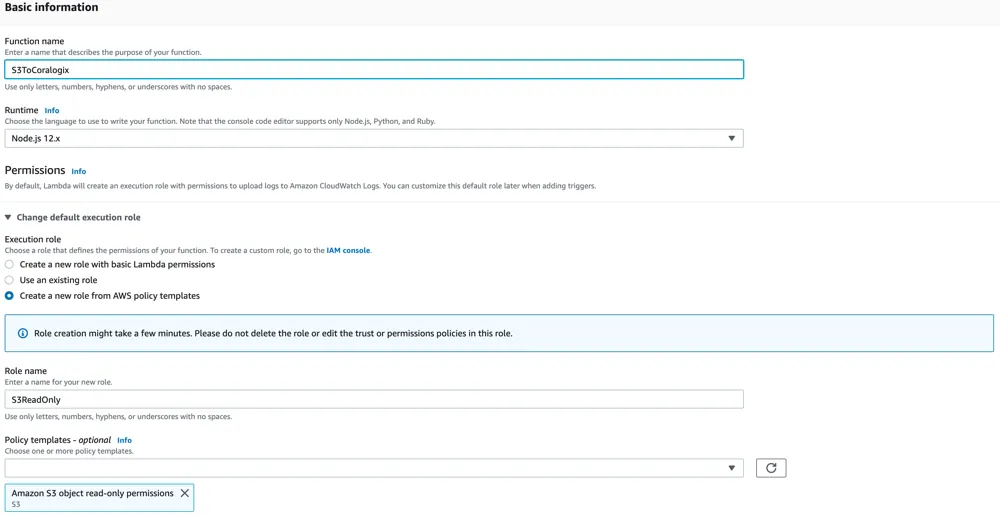
- Create an "author from scratch" Node.js 12.0 runtime lambda with an S3 read permissions
- At "Code entry type" choose "Upload a ZIP file" and upload "s3ToCoralogix.zip"
https://s3-eu-west-1.amazonaws.com/coralogix-public/tools/s3ArchivedReader.zip
-
Add the private_key environment variable.
-
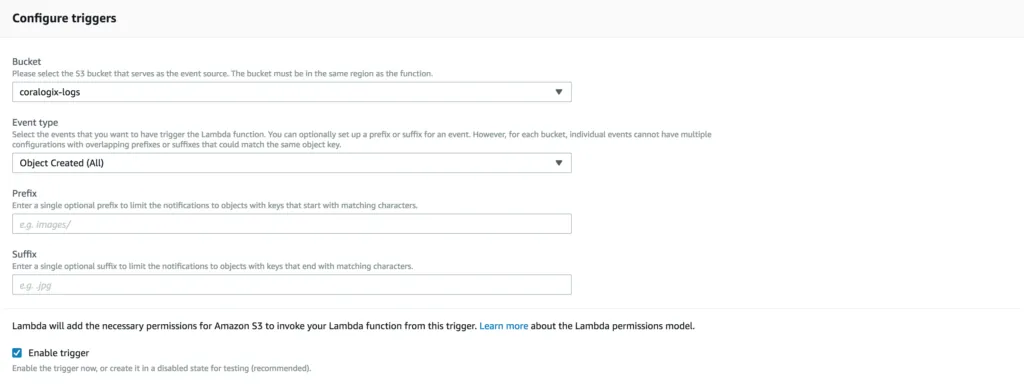
Choose the S3 bucket you want to get triggered by and change the event type from "PUT" to "Object Created(All)"
- Click 'Save'
You're all set!