Dataspaces and datasets
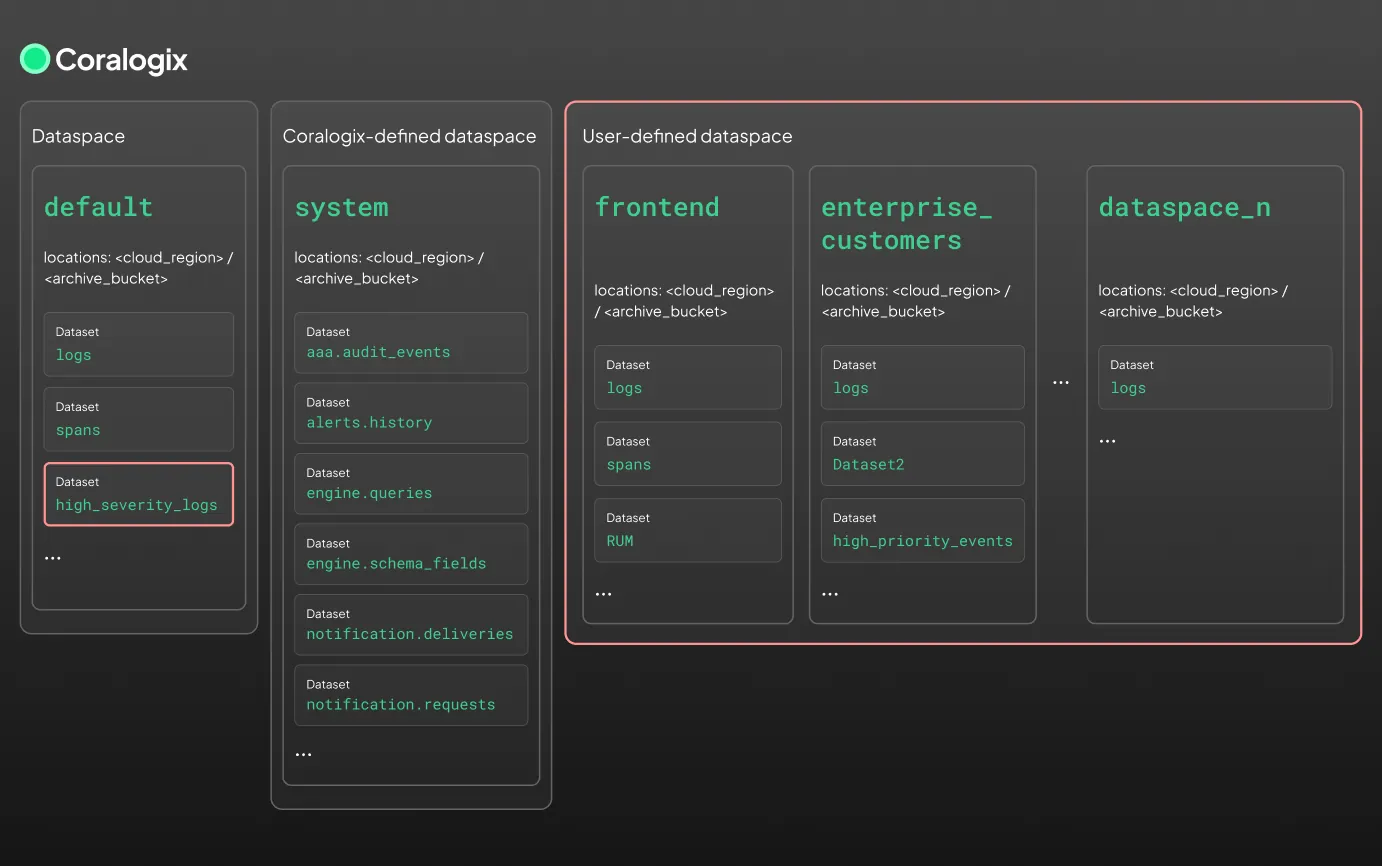
Dataspaces and datasets provide a two-tiered model for organizing, routing, and securing observability data in Coralogix.
- Dataspaces define organizational boundaries, such as environments, business units, teams, or regions.
- Datasets define logical groupings of content, such as logs, traces, metrics, or enrichment data.
Create a user-defined dataset, view and manage system datasets, or query existing datasets in Explore.
Dataspaces
A dataspace is a logical container for one or more datasets. It acts as a control layer for:
- Routing logic
- Storage structure
- Retention policies
- Access control
- Schema enforcement
Think of dataspaces like databases. Each dataspace groups datasets under a single namespace and enforces shared configuration. For example, your organization might define dataspaces for frontend, backend, and security:
frontend/
  └── ui.events
  └── user.interactions

backend/
  └── service.requests
  └── system.traces
Configuration inheritance
When a dataset is created inside a dataspace, it automatically inherits the dataspace's configuration:
- S3 storage paths
- Retention rules
- Access policies
- Metadata enrichment
For example, if a dataspace defines the S3 path s3://my-bucket/my_prefix, new datasets inside that dataspace automatically write to:
s3://my-bucket/my_prefix/dataset1
s3://my-bucket/my_prefix/dataset2
This inheritance is dynamic, no manual setup is needed when new datasets appear.
Types of dataspaces
| Type | Description |
|---|---|
| default | The main user-facing dataspace. Contains datasets like logs, spans, and any user-defined datasets. |
| frequentsearch | A Coralogix-managed dataspace that exposes your High (Frequent Search) tier logs and spans (indexed in hot storage (OpenSearch)) for fast, interactive queries. Reference its datasets as frequentsearch/logs and frequentsearch/spans. |
| system | A Coralogix-managed dataspace for internal datasets such as alert history, audit events, and schema metadata. |
| user-defined | Custom dataspaces created by users to segment data by team, region, environment, or use case. Coming soon. |
Datasets
A dataset is a scoped collection of related data within a dataspace. Think of datasets like tables in a database. Each dataset contains a specific stream of observability data (e.g., logs, traces, alerts) that inherits configuration from its parent dataspace.
Datasets are created:
- Automatically: via routing logic
- Manually: through the UI
- Dynamically: based on values like
$d.region,$l.applicationname, etc.
Datasets currently work only with archived data.
Because datasets are just identifiers, they can take any name, including dot notation like engine.queries. This does not imply a hierarchy. engine.queries and engine.schema_fields are separate, unrelated datasets.
Streaming vs summary datasets
User-defined datasets in the default/ dataspace come in two flavors based on how they're populated:
- Streaming datasets: populated in real time by TCO Optimizer policies routing ingested data.
- Summary datasets: populated by Background queries v2 writing query results for downstream reuse.
For the full distinction, entity-type rules, and when to use each, see Streaming vs summary datasets.
Key capabilities
| Capability | Description |
|---|---|
| Dynamic creation | Datasets are created on-the-fly based on routing rules or labels like $l.applicationname. No manual setup required. |
| Scoped performance | Segmented datasets reduce schema collisions and improve query speed by narrowing the search space. |
| Granular control | Apply retention, access, routing, and enrichment policies at the dataset level. |
| Reusability | Save query results to a summary dataset and reuse them later for dashboards, joins, or long-term analytics. |
Dataset schemas
Each dataset has an associated schema, influenced by its pillar (logs, spans, etc.) and entity type (e.g., alerts, browserLogs, cpuProfiles).
| Pillar | Entity type | Example schema |
|---|---|---|
| logs | alerts | { alert_name, severity, status, triggered_at } |
| logs | browserLogs | { user_agent, page_url, timestamp } |
| logs | text | { text: "..." } |
| spans | spans | OpenTelemetry-formatted span objects |
| metrics | metrics | { __name__, value, labels... } |
| binary | sessionRecordings | Metadata + link to binary |
| binary | files | File metadata (e.g., name, size, uploaded_by) |
Schema docs for common datasets:
Enabling and disabling datasets
Datasets, especially system datasets, must be manually enabled. Once enabled:
- All users can query them
- They count toward your daily quota
- Previously generated data remains accessible, even if later disabled
Disabling a dataset stops its ingestion, not its storage.
Managing datasets
Manage your datasets from the UI by navigating to Data Flow, then Dataset Management. Here, you can view all active datasets, enable/disable system datasets, apply configuration rules, view schema definitions, and inspect sample documents.
Query syntax
Query any dataset with DataPrime using the source command:
source <dataspace>/<dataset>
Examples:
source default/logs
source system/engine.queries
source frontend/spans
If no dataspace is provided, the default dataspace is assumed:
source logs // equivalent to source default/logs
If you're only using the default dataspace, your existing queries will continue to work.
System datasets
Coralogix includes several read-only, auto-generated datasets in the system dataspace:
| Dataset | Description |
|---|---|
| system/aaa.audit_events | Stores audit logs for compliance and access monitoring. |
| system/alerts.history | Records alert evaluation and trigger metadata. |
| system/engine.queries | Historical record of user queries for introspection and optimization. |
| system/engine.schema_fields | Tracks field-level schema evolution over time. |
| system/labs.limit_violations | Records each time a configured limit is exceeded. |
| system/notification.deliveries | Logs Notification Center delivery events. Alerts record delivery failures, while Cases record both successful and failed deliveries. |
| system/dataplan.quota_events | Stream of quota-related events, allocations, consumption, and threshold breaches. |
| system/dataplan.usage_events | Aggregated team data usage events, after unit ratios are applied. |
See System dataspace for more information.