Using Compact Span Metric
Overview
Compact span metric is an optimized metric type designed to improve the performance of the APM Service Catalog and Database Catalog pages, especially in large-scale environments. Traditional Span Metrics can carry very high cardinality, leading to slow load times and limited scalability. Compact span metric addresses this by keeping only the most essential dimensions, reducing metric cardinality while delivering the core insights needed for monitoring and troubleshooting.
Note
- The compact span metric is enabled by default only for Span Metrics users.
- This setup is additive-compact metrics are sent alongside the existing Span Metrics, not as a replacement. This is relevant for both Service and Database Catalogs.
- When you enable the compact metric, data in the main catalog pages will appear only from the moment you start sending it. Drilldowns will continue to use the full span metrics as before.
Key benefits
- Uses essential labels only:
- Service Catalog:
service_name,status_code,k8s_cluster_name,span_kind,host.name - Database Catalog:
service_name,status_code,k8s_cluster_name,db_namespace,db_system,host.name
- Service Catalog:
- Optional histogram control: the
lehistogram can be disabled to further reduce load. - Reduction in cardinality: lowers metric permutations.
- Low-latency performance: enables much faster load times in large environments.
- Backward compatibility: compact metrics are sent in addition to existing span metrics, ensuring no breakage in drilldowns.
Enabling compact span metrics
With Coralogix OTel integration
Using the Coralogix latest integration is strongly recommended, as it’s continuously updated and aligned with the latest OpenTelemetry releases. To benefit from compact span metric, make sure to upgrade your otel-integration to version v0.0.230 or higher.
The following metrics are enabled by default:
Service catalog:
compact_calls_totalcompact_duration_ms_countcompact_duration_ms_sumcompact_duration_ms_bucket
Databases catalog:
db_compact_calls_totaldb_compact_duration_ms_countdb_compact_duration_ms_sumdb_compact_duration_ms_bucket
Without Coralogix OTel integration
If you are not using one of the Coralogix integrations (Kubernetes or ECS on EC2) and instead run your own OpenTelemetry collector, you can generate a working example configuration directly from the Coralogix UI and adapt it to your setup.
Follow the steps below to generate a baseline configuration using the Kubernetes integration UI:
- If the Kubernetes integration is not yet configured, follow the instructions here. If the integration is configured, skip this step and proceed to the next one.
- From the Kubernetes Complete Observability page, Select Actions, then Update.
Navigate to Review values.yaml and Deploy and select Download content. Download the Kubernetes manifest.
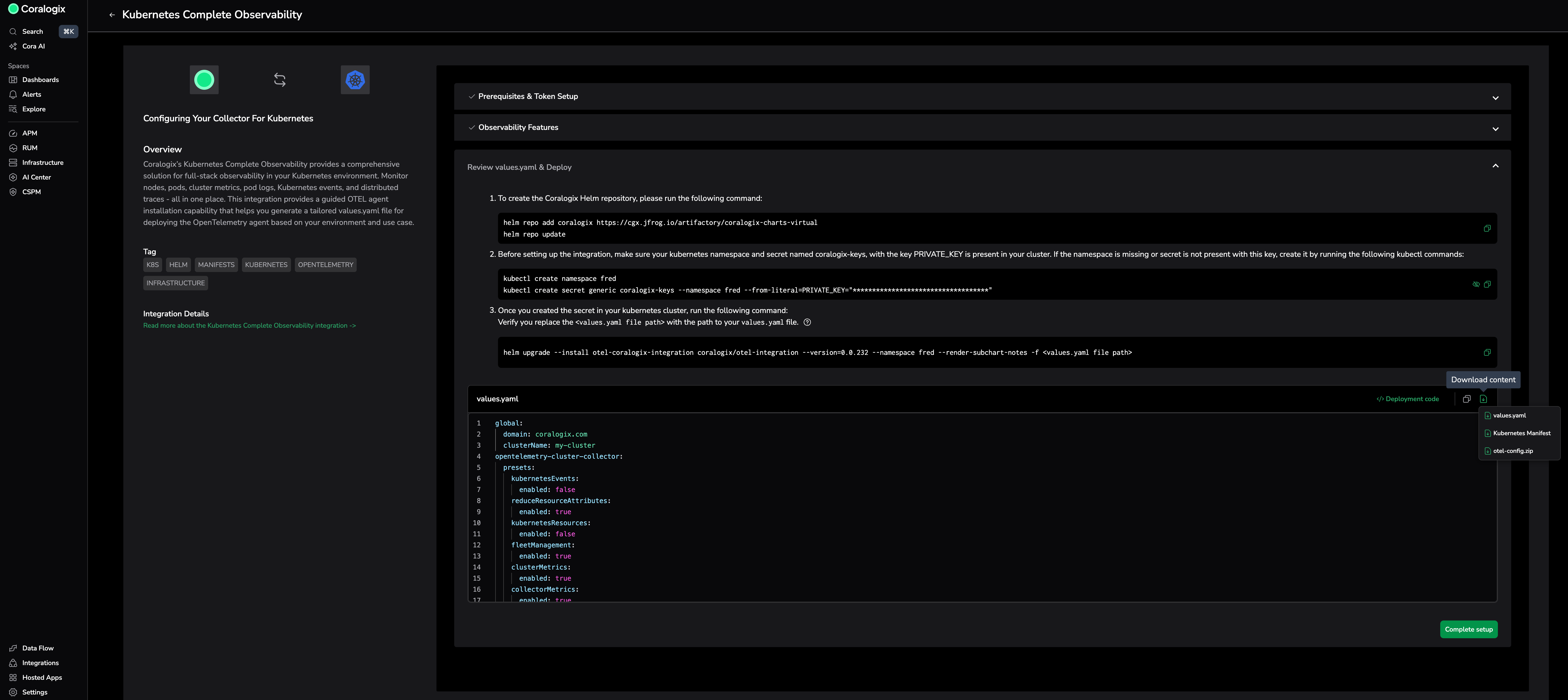
Use the downloaded manifest as a reference configuration. It includes a fully configured setup and reflects the latest supported settings. You can adapt this configuration for your own OpenTelemetry collector if needed.
Note
Whenever possible, use the Coralogix integrations for Kubernetes or ECS on EC2. They provide ongoing updates, feature compatibility, and streamlined support, while still allowing you to inspect and reuse the underlying configuration when customization is required.
UI changes with compact metric
The following fields are affected when compact metric is enabled:
- Unsupported filters are hidden in the main service catalog and db catalog pages.
- Service and Database drilldown pages remain unchanged and continue to use all dimensions from the full span metrics.
Disabling compact span metric
To disable compact span metric, update and configure your OpenTelemetry collector:
- Update to the latest otel-integration:
v0.0.230or higher. - Apply the following preset in your Helm chart configuration:
otel-integration:
  opentelemetry-agent:
    presets:
      spanMetrics:
        enabled: true
        compactMetrics:
          enabled: false
          dropHistogram: true
opentelemetry-agent:
  presets:
    spanMetrics:
      enabled: true
      dbMetrics:
        enabled: true
        compactMetrics:
          enabled: false
          dropHistogram: true