Service Map
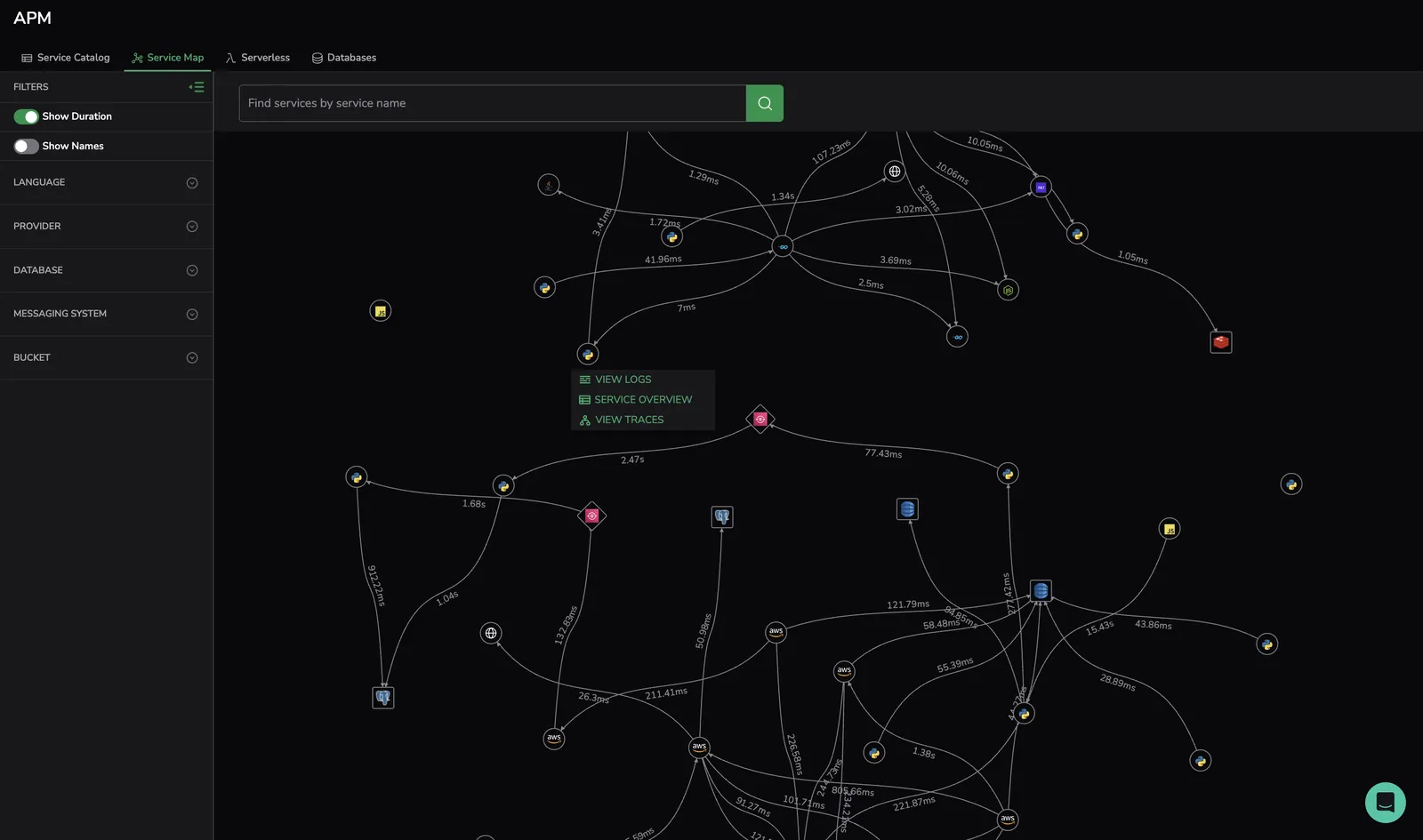
Service Map fully visualizes your system architecture, breaking down your application into all its constituent services and drawing the observed dependencies between them in real-time based on your distributed tracing.
Setup
To use Service Map:
- Install and configure Coralogix APM.
- Send spans (not only Span Metrics) using head or tail sampling.
Span attributes
To identify certain services in the Service Map, define the following attributes.
AWS S3
| Attribute | Type | Description |
|---|---|---|
span.kind | string | Set to CLIENT, as it's an external call |
rpc.system | string | Set to aws-api |
rpc.service | string | Contains S3 or tag with prefix aws.s3 |
aws.s3.bucket | string | The name of the S3 is retrieved from this attribute. If missing, S3 is used |
We also identify AWS S3 spans based on the specific S3 icon.
Kafka
| Attribute | Type | Description |
|---|---|---|
span.kind | string | In one match (call), Kafka can be either a destination or source service. Set to PRODUCER if Kafka is the destination service.Set to CONSUMER if Kafka is the source service. |
messaging.system | string | Set to kafka |
messaging.destination or messaging.destination.name | string | Name of the topic displayed the UI: "kafka topic <x>" |
We also identify Kafka spans based on the specific Kafka icon.
RabbitMQ
| Attribute | Type | Description |
|---|---|---|
span.kind | string | In one match (call), RabbitMQ can be either a destination or source service. Set to PRODUCER if Kafka is the destination service. Set to CONSUMER if Kafka is the source service. |
messaging.system | string | Set to rabbitmq |
messaging.destination or messaging.destination.name | string | Name of the topic displayed the UI: "RabbitMQ <x>" |
We also identify RabbitMQ spans based on the specific RabbitMQ icon.
Redis
| Attribute | Type | Description |
|---|---|---|
span.kind | string | Set to CLIENT, as it's an external call |
db.system | string | Set to redis |
db.name + db.redis.database_index | string | Database name. If one attribute is missing, the system uses the attribute that is present. |
How it works
The Service Map offers insights into your services and their well-being, effectively cutting through extraneous information to pinpoint problematic areas.
Access Service Map
To access this feature, navigate to APM, then to Service Map in your Coralogix toolbar.
Visualize traces
View a visualization of your traces, organized into clusters. In the left-hand sidebar, filter by LANGUAGE, PROVIDER, ENVIRONMENT and/or DATABASE, MESSAGING SYSTEM, and BUCKET.
Identify service dependencies
The Service Map presents a comprehensive overview of a service's dependencies, encompassing connections in various environments.
- Hover over and select a service point to view all of its associated information.
- Select the service and proceed to viewing its overview, logs, and traces, as shown below.
- Search for a service using the search function.
Limitations
The Service Map supports rendering up to 20,000 nodes. If the map exceeds this limit, it is not rendered. To view the map, refine your scope by reducing the number of services.
Next steps
If your map includes Lambda functions, see Serverless monitoring for function-level invocations and traces.