Insights
Insights surface data-quality and coverage gaps across your APM catalog - services that aren't profiled, services with no owner or SLO, or an account nearing a catalog limit - so you can fix what's holding your observability back before it costs you during an incident. The section sits at the top of the catalog, summarizing the gaps across the services and databases in view, with a drawer that lists every one.
Use it to:
- Close coverage gaps: find services that aren't profiled, have no detected language, or aren't sending spans, and fix them before you need the data.
- Drive ownership and reliability: surface services with no owner or no SLO, so every service has a team accountable for it and a reliability target to meet.
- Stay ahead of catalog limits: catch when your account is near or at an entity, identity, or cardinality limit before entities start to drop.
- Scope the work to your team: filter insights by environment and team to see only what you're responsible for.

What you need
- Coralogix Application Performance Monitoring (APM) installed and configured.
- Compact span metrics for your services - the catalog, and the insights computed from it, read these.
Where Insights appears
The Insights section sits at the top of the catalog, between the search bar and the Overview widgets. It opens expanded, showing up to four insight cards. Select the section header to collapse it: the cards fold into compact pills that still name every gap, so you can keep the summary without the full cards. The expanded or collapsed state travels with the URL, so it's preserved when you copy a link or save a view.
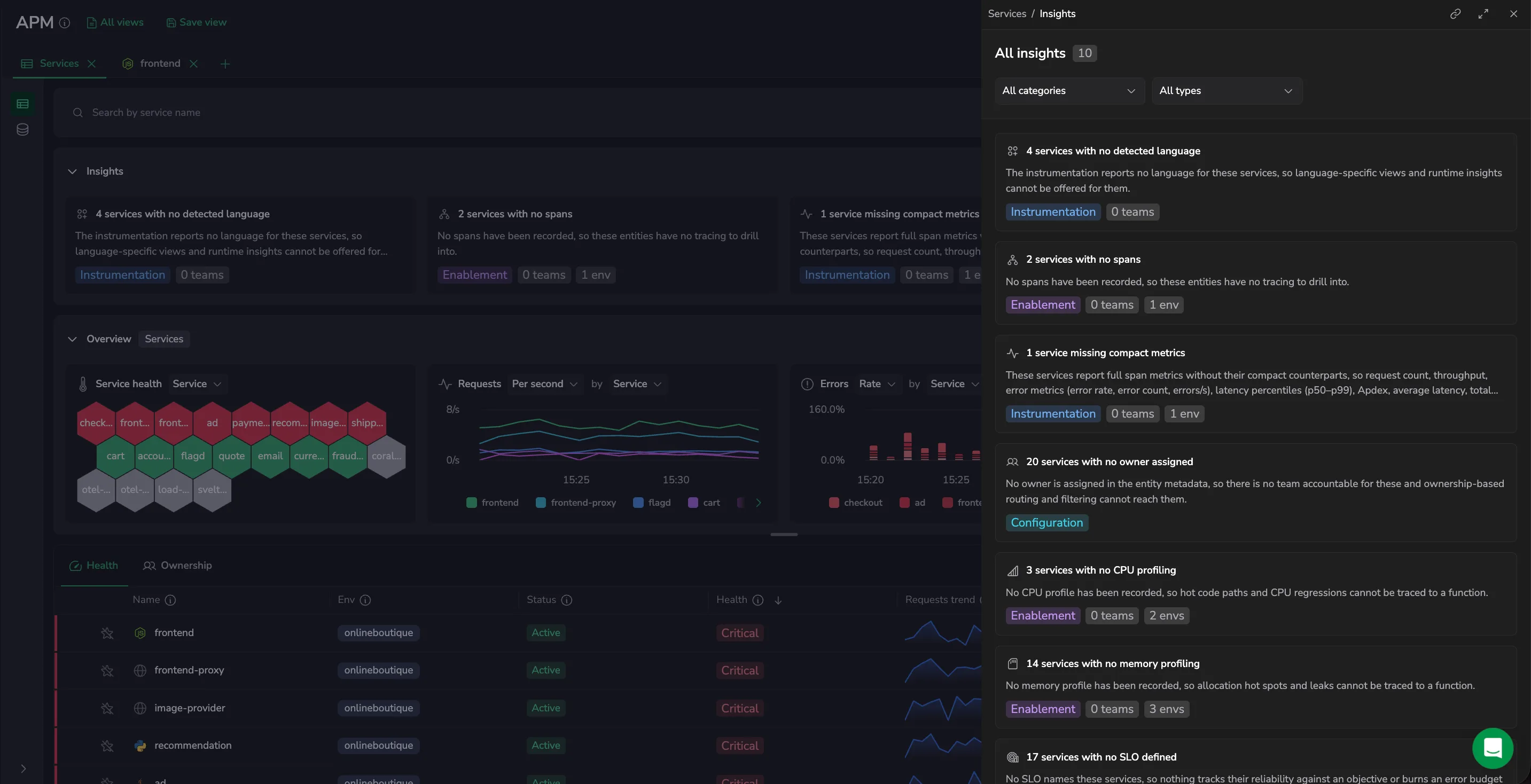
When there are more than four insights, View all insights (n) appears on the right of the header, where n is the total count. Select it to open the All insights drawer.
Read an insight
Each insight card shows:
- An icon for the kind of gap.
- A title naming the gap and how many entities it affects, for example 21 services with no CPU profiling.
- A short description of the impact.
- A category badge (see Insight categories).
- Up to two count pills: n teams, the owners affected, and n envs, the environments affected.
Insight cards are read-only. They tell you what's missing, how many entities and teams it affects, and in which environments - so you know what to fix and where. Use the catalog's filters to narrow to the affected entities, and the feature docs linked under Insight types to resolve each gap.
Insight categories
Coralogix assigns every insight a category. Filter by category in the All insights drawer to focus on one kind of work:
- Enablement: a capability isn't turned on yet for the entity, such as CPU or memory profiling, runtime metrics, or server spans.
- Configuration: something needs setting up, such as an owner or an SLO.
- Instrumentation: the telemetry itself is incomplete, such as a service with no detected language or one sending full span metrics without their compact counterparts.
- Limits: your account is near or at a catalog limit - entities, identities, or cardinality.
- Other: anything that doesn't fall into the categories above.
Insight types
The drawer also filters by type. Each type flags one specific gap. Only the types present in your data appear in the filter.
| Type | What it flags | Resolve with |
|---|---|---|
| No language detected | APM can't determine the service's language, so language-specific views and runtime insights are unavailable. | APM onboarding |
| No server spans | The entity has recorded no server (incoming) spans, so there's nothing to trace. | APM onboarding |
| No transactions | The service isn't producing transaction data. | Enable the transactions processor |
| No CPU profiling | No CPU profile has been recorded for the service. | Profiling |
| No memory profiling | No memory profile has been recorded for the service. | Profiling |
| Missing runtime metrics | The service's runtime metrics aren't being reported. One insight is raised per language. | Runtime metrics |
| No owner | No owner is set in the entity's metadata, so no team is accountable for it. | Entity Metadata API |
| No SLO | No SLO is defined for the service, so its reliability isn't tracked against a target. | Service SLOs |
| Missing compact metrics | The entity isn't sending the compact span metrics the catalog relies on. | Using compact span metrics |
| Entity limit | Your account is near or at its limit for catalog entities. | Cardinality limits |
| Identity limit | Your account is near or at its limit for entity identities. | Cardinality limits |
| Cardinality limit | Your account is near or at a cardinality limit. | Cardinality limits |
View all insights
Select View all insights (n) in the section header to open the All insights drawer - the complete list, not just the four cards on the overview. The drawer reads the same insights as the section, so it opens without reloading.
Narrow the list with two filters:
- Category: a single-select dropdown that lists only the categories present in your data, plus All categories.
- Type: a single-select dropdown that lists only the types present in your data, plus All types.
Select Copy link to copy a link that reopens APM with the drawer open at the current scope. The in-drawer category and type selections reset to All when the drawer reopens.
How insights are scoped
- Entity type: the sidebar selection - Services or Databases - determines which entities' insights you see.
- Filters: the catalog's sidebar filters - environment, team, language, database system, and health - also narrow the insights. The service-name search box does not.
- No time range: insights describe the current state of your catalog, not a time window, so the time picker doesn't change them.
- Account-wide insights, such as catalog limits, appear regardless of the entity type in view.
When no gaps are found for the current scope, the section reads Nothing needs attention. If only some insights could be loaded, it shows the ones it has alongside a note that the rest couldn't be loaded.
Next steps
Give the services Insights flags a reliability target to meet with Service SLOs.